TrainGone — an ASL dictionary you can search by sight.
A mobile dictionary that lets learners look up a sign by what they see, not the word they don't know yet.
- Role
- UX research · interaction design
- Context
- Stanford CS147, 2025
- Build
- React Native
- Recognition
- CS147 UX Award — Greatest Societal Impact
01The problem
Every ASL learner runs into the same wall. You see a sign you don't recognize, and the only way to look it up in a normal dictionary is to already know the English word for it. That's backwards. The whole reason you're searching is that you don't know the word.
ASL isn't English on the hands. It's a visual-spatial language with its own grammar, and signs are built from physical parameters: the handshape you make, the movement you trace, and the orientation of your palm. English-first dictionaries throw all of that away and force learners back into the language they're trying to leave.
02Research
Before designing anything, I talked to the people who live this. I ran interviews and usability sessions with Deaf native signers, ASL learners at different levels, and working interpreters to understand how each group actually recalls and searches for signs.
- Learners remembered fragments of a sign (a shape, a direction) long before they could name it.
- Native signers reasoned about signs in terms of their physical parameters, not English glosses.
- Interpreters wanted speed and precision, and were wary of tools that flatten ASL into one-to-one word mappings.
The throughline was clear: a dictionary should meet learners where their memory already is, in the visual form of the sign.
The reframe: don't ask "what's the English word?" Ask "what did the sign look like?" Search by handshape, movement, and orientation, the same parameters native signers use to think about the language.
03Design
TrainGone flips the lookup. Instead of a text box, learners filter the dictionary by the parameters of the sign they saw: pick the handshape, the direction of movement, and the palm orientation, and the app narrows to matching signs with video.
Browse the sign dictionary, search and sort by what you remember, then practice with video prompts until the sign sticks. Built in React Native.
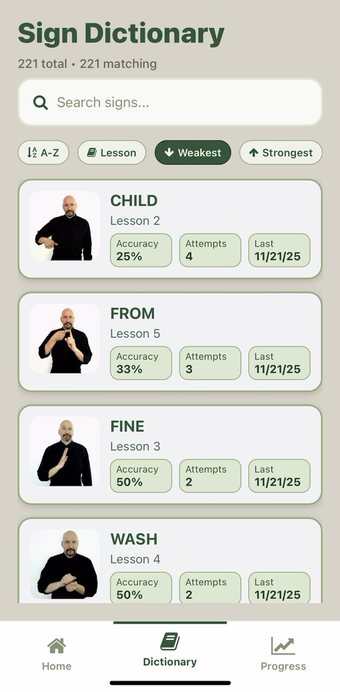
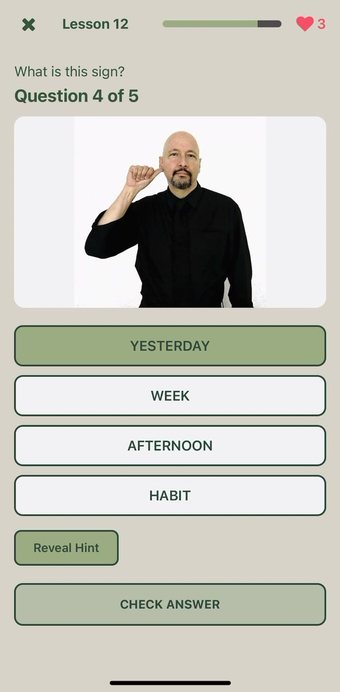
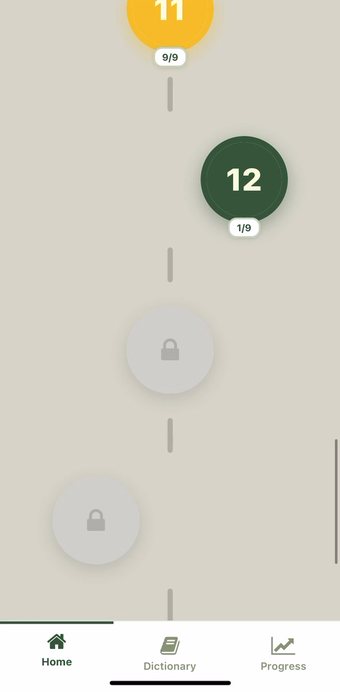
Designing for two audiences at once
An accessibility tool has to be accessible itself. Every interaction was built to work for Deaf and hearing users alike, leading with visual clarity, generous tap targets, and video-first results rather than audio cues. Decisions were tested back with signers rather than assumed.
"Meet learners where their memory already is, in the shape of the sign."
04Outcome
TrainGone received the CS147 UX Award for Greatest Societal Impact, recognizing both the rigor of the user research and the size of the problem it addresses for the ASL-learning community.
Course project, Stanford CS147 — Introduction to Human-Computer Interaction.
05What I took from it
The strongest accessibility work doesn't bolt features onto an existing model. It questions whose mental model the product was built around in the first place. TrainGone only works because it stopped treating ASL as a translation of English and started treating it as its own language with its own way of being searched.